.png?width=11229&height=5299&name=Copy%20of%20LDA%20Logo%20RGB%20(1).png)
Traditional Tracking
As LDA has evolved over the years, we’ve realized how much of a pain point block of business management can be for advisors with their insurance business. When I meet with advisors and ask how they keep track of their block of business, before using LDA, I’m almost always provided one of these 3 responses:
Tracking through a spreadsheet.
While spreadsheets certainly beat the default process of tracking clients, there is a lot of work involved in creating and updating client and policy data through a document. Since all carriers provide data in different formats, standardizing all the data can be time-consuming and complicated. These documents don’t notify you based on the data, so proactive tracking is a must. Plus, we’re all human, so mistakes or missed opportunities are usually inevitable.
CRM
CRM’s are fantastic, versatile programs and highly recommended for tracking client communication. When it comes to insurance, though, that versatility is a disadvantage since CRMs aren’t designed for the type of data that carriers provide. This means a lot of time and resources are needed to build the CRM to work with your policy data. Plus, manual data entry or file imports are still required.
Carrier Systems and Alerts
This is by far the most common answer I hear because no action is needed. This is the default industry setup to manage clients and their policies. Following this process means you’re receiving renewal alerts 60-90 days before the renewal date, on average, and are required to go to that carrier's online portal to gather the information. This typically leaves advisors scrambling to meet the client and get something in underwriting before it’s too late.
LDA Tracking
It’s safe to say that these methods all have their own unique gaps. That’s why we offer block of business management in LDA, to eliminate these common issues and make block of business management faster and easier. Here are the ways we help thousands of advisors across Canada in managing their book of business:
Design for Insurance Data
LDA is built for the data provided by the insurance carriers. For Premier subscribers, importing your client data is included in the account setup process.
Data feeds are included in the enterprise version of LDA! This means your clients and policy data are imported and updated automatically. Ask your MGA about getting datafeeds established in LDA!
Opportunity Identification
LDA makes it easy to find opportunities in your block of business. The Case Opportunity Filters provide an up-to-date report of upcoming opportunities.

For example, by selecting the Term 10 Conversion button, LDA will show all T-10s issued after today's date, 10 years ago, in an earliest to latest order.
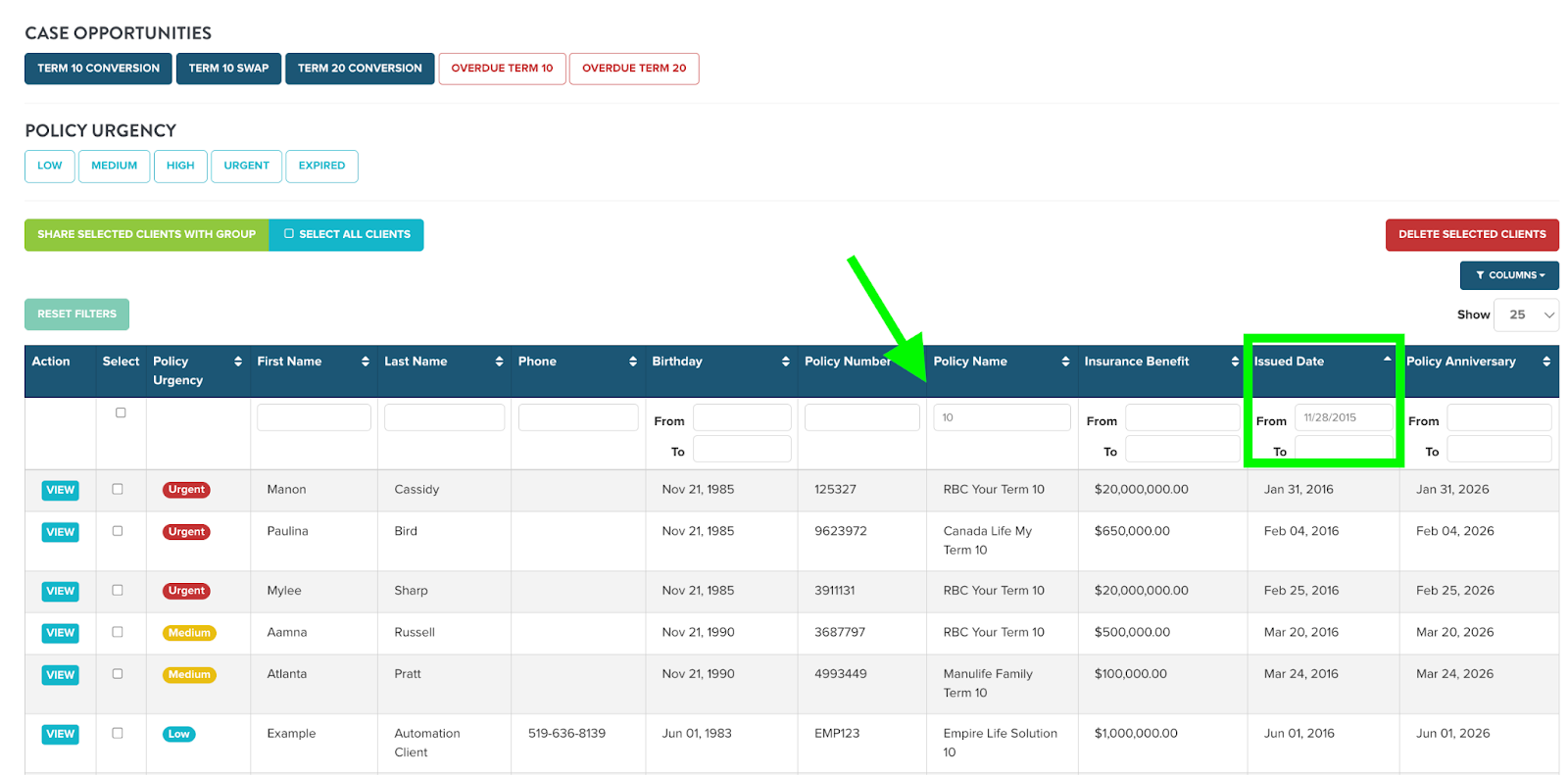
Anything we offer as a filter also has a built-in notification. For T-10 renewal opportunities, starting at the 7th year anniversary, LDA provides a notification automatically, informing you of this renewal opportunity. These notifications continue each year on the policy anniversary, up until 90 days before the renewal. No action is required to enable these alerts.

These filters and notifications are available for Term 10 Swaps, Term 20 Renewals, Overdue Term 10s and Overdue Term 20s.
Actionable Data
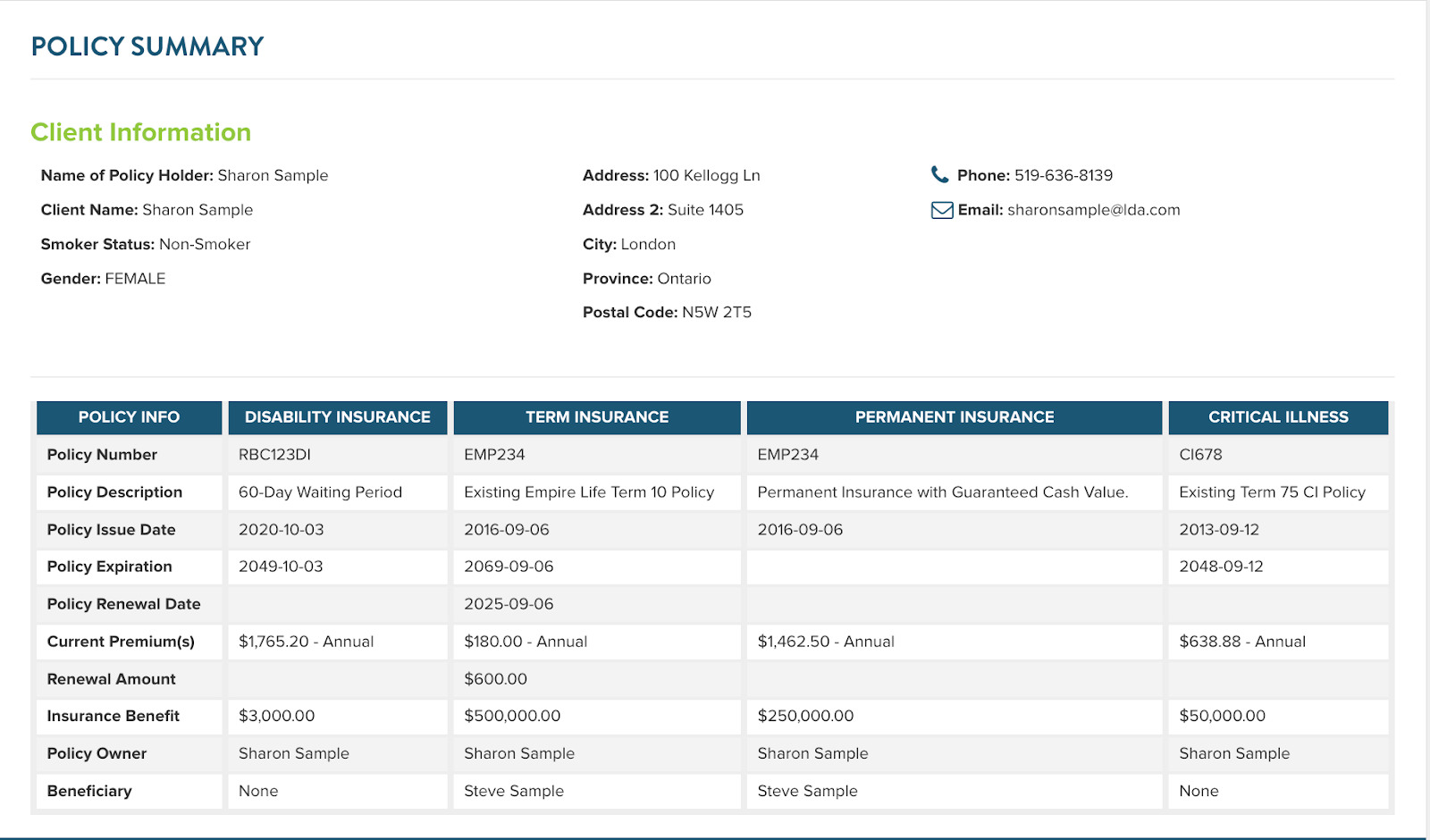
LDA isn’t a back office used exclusively for you to gather information. The purpose of this is to be used for both you and your clients. Any policies in LDA can be either shown in a Policy Summary report or used in an LDA presentation to compare against new recommendations.
Policy Summary Reports can be leveraged with a click of a button in the client’s profile page. These one-page reports will help save you time compared to producing these summaries manually, and offer your clients a compact and professional summary of all their policies.
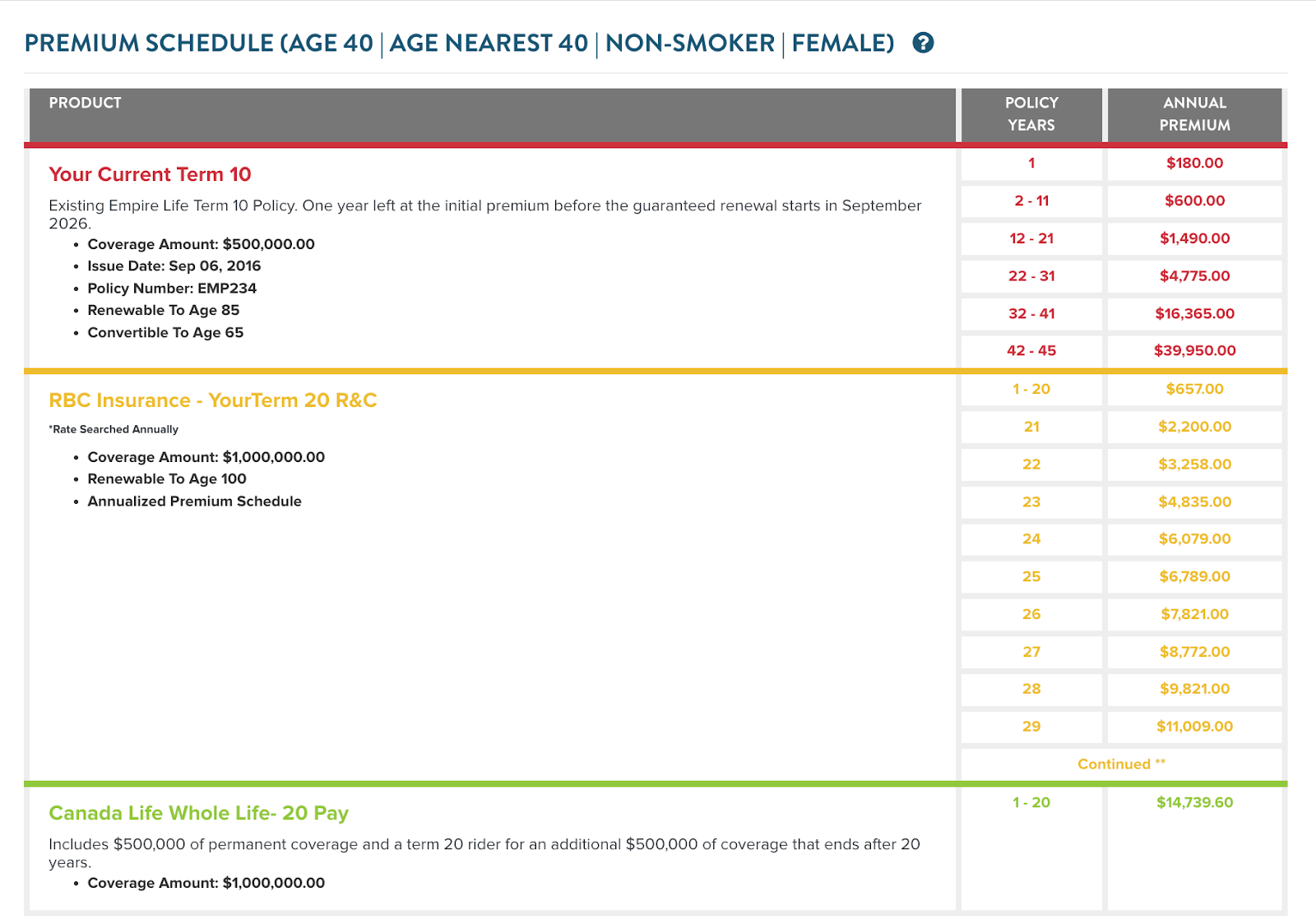
When the time comes to discuss converting the policy or rewriting for new insurance, the policy data can be easily brought into an insurance presentation. These existing policies can be compared with any new plan recommendation based on your preferences. By having the data in LDA, this has saved significant time for numerous LDA subscribers by eliminating duplicate data entry of the client and policy information.
Mark As Sold
If the client proceeds with one of the recommendations from your LDA presentation, you can mark these new plans as sold. The Mark As Sold feature takes all the data used in the presentation and saves it to the client profile. This data can be used in the future for Policy Summary Reports or Opportunity Tracking.
We’re Here to Help!
If you don’t have your client and policy data in LDA, feel free to contact our customer success team to get this process started with you! If you wish to learn more about LDA’s block of business management, use the meeting form below to book a one-on-one meeting.